> ## Documentation Index
> Fetch the complete documentation index at: https://www.edgee.ai/docs/llms.txt
> Use this file to discover all available pages before exploring further.
# Organization
> Select your organization, configure shared settings, and understand how they apply to squads and agents.
An organization groups your team’s members, agents, keys, usage, and shared settings. Your account can belong to several organizations; select the right one before changing configuration.
## Configure shared settings
As an administrator, open **Org. Settings → Gateway**. Set organization-wide rules here; use squad or agent settings for changes that should affect a smaller group.
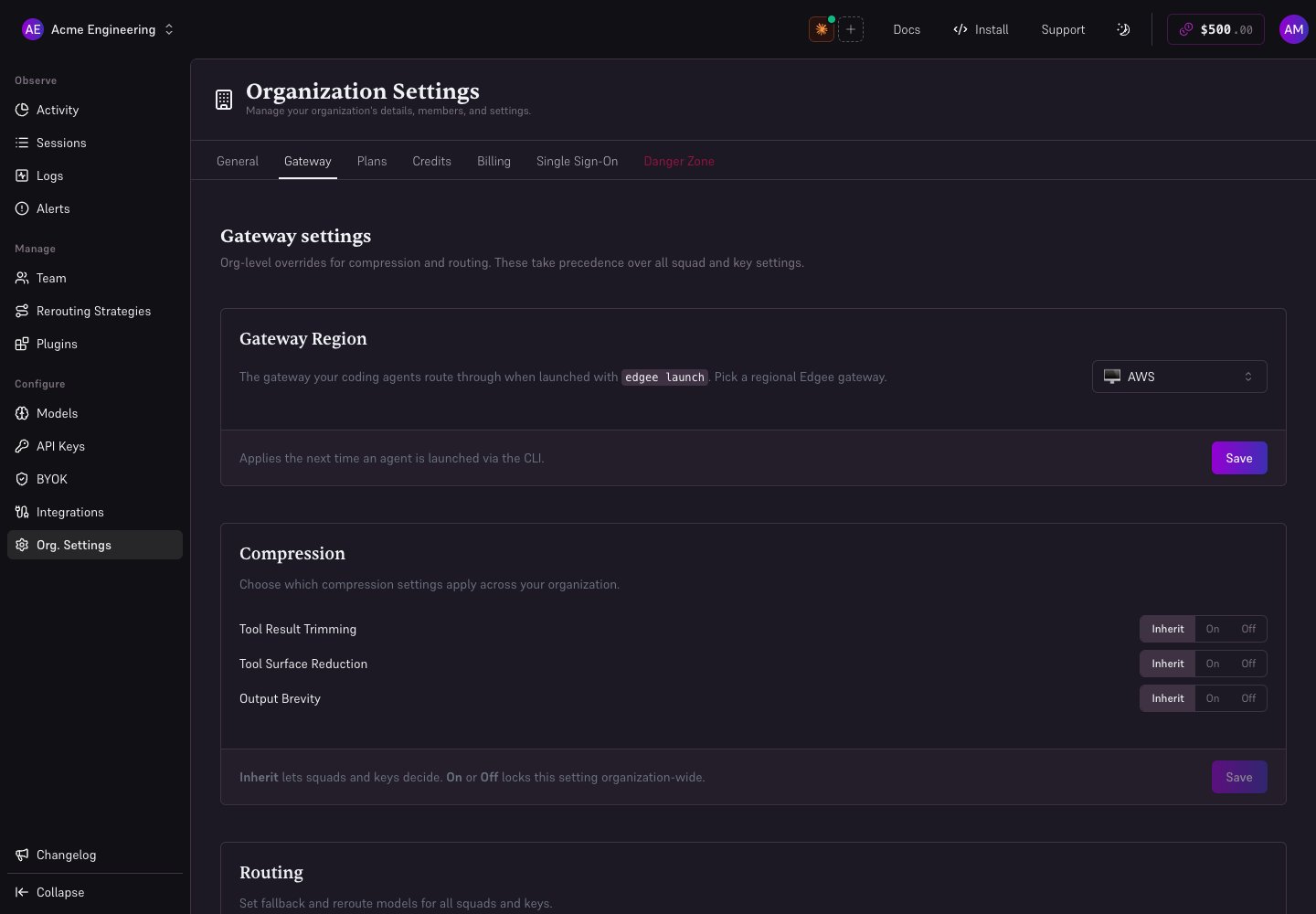 ## Understand On, Off, and Inherit
| Organization value | Effect |
| ------------------ | ---------------------------------------------------- |
| **On** | Enable and enforce the setting for the organization |
| **Off** | Disable and enforce the setting for the organization |
| **Inherit** | Let lower scopes choose their setting |
Both **On** and **Off** can lock a setting for a squad or agent. Choose **Inherit** to delegate that decision.
Compression and shared gateway settings resolve from **organization → squad → key**: the highest scope that explicitly sets a value wins. Strategy assignments also support members: **organization → squad → member → key**.
On routing lists, **Inherit** lets lower scopes decide; **Custom** enforces the selected configuration. A Strategy takes over routing for its effective scope, including its fallback configuration.
Spending limits are checked separately across scopes. A Strategy and a hard usage limit cannot coexist on the same scope.
## Choose what to configure
| Setting | Guide |
| -------------------------------------- | -------------------------------------------------- |
| Compression | [Token compression](/docs/features/token-compression) |
| Budget-driven routing | [Strategies](/docs/features/routing-strategies) |
| Error fallback and model substitutions | [Retry and fallback](/docs/features/retry-and-fallback) |
| Provider credentials and BYOK Only | [BYOK](/docs/features/byok) |
| Allowed models | [Model access](/docs/features/model-access) |
| Request capture and encryption | [Debug logs](/docs/features/debug) |
| Licensed private gateway | [Self-hosting](/docs/self-hosting/overview) |
Region and custom endpoint controls select which gateway the CLI uses on its next launch. See [CLI configuration](/docs/cli/configuration).
## Edgee MCP
In **Org. Settings → General**, the **Edgee MCP** control governs automatic injection of Edgee’s session tools. Disabling it can prevent agents from attaching session names, repositories, and PRs automatically. Custom MCP servers are managed separately through [Plugins](/docs/features/plugins).
## Verify a change
Save the relevant section, then launch a new session and inspect its requests in **Logs**. Check the served model, provider, and compression results. Historical requests retain their original settings.
If a control is locked, inspect the organization value, the member’s squad, and the agent’s settings. For routing, also check any Strategy assigned to the member.
## Understand On, Off, and Inherit
| Organization value | Effect |
| ------------------ | ---------------------------------------------------- |
| **On** | Enable and enforce the setting for the organization |
| **Off** | Disable and enforce the setting for the organization |
| **Inherit** | Let lower scopes choose their setting |
Both **On** and **Off** can lock a setting for a squad or agent. Choose **Inherit** to delegate that decision.
Compression and shared gateway settings resolve from **organization → squad → key**: the highest scope that explicitly sets a value wins. Strategy assignments also support members: **organization → squad → member → key**.
On routing lists, **Inherit** lets lower scopes decide; **Custom** enforces the selected configuration. A Strategy takes over routing for its effective scope, including its fallback configuration.
Spending limits are checked separately across scopes. A Strategy and a hard usage limit cannot coexist on the same scope.
## Choose what to configure
| Setting | Guide |
| -------------------------------------- | -------------------------------------------------- |
| Compression | [Token compression](/docs/features/token-compression) |
| Budget-driven routing | [Strategies](/docs/features/routing-strategies) |
| Error fallback and model substitutions | [Retry and fallback](/docs/features/retry-and-fallback) |
| Provider credentials and BYOK Only | [BYOK](/docs/features/byok) |
| Allowed models | [Model access](/docs/features/model-access) |
| Request capture and encryption | [Debug logs](/docs/features/debug) |
| Licensed private gateway | [Self-hosting](/docs/self-hosting/overview) |
Region and custom endpoint controls select which gateway the CLI uses on its next launch. See [CLI configuration](/docs/cli/configuration).
## Edgee MCP
In **Org. Settings → General**, the **Edgee MCP** control governs automatic injection of Edgee’s session tools. Disabling it can prevent agents from attaching session names, repositories, and PRs automatically. Custom MCP servers are managed separately through [Plugins](/docs/features/plugins).
## Verify a change
Save the relevant section, then launch a new session and inspect its requests in **Logs**. Check the served model, provider, and compression results. Historical requests retain their original settings.
If a control is locked, inspect the organization value, the member’s squad, and the agent’s settings. For routing, also check any Strategy assigned to the member.