> ## Documentation Index
> Fetch the complete documentation index at: https://www.edgee.ai/docs/llms.txt
> Use this file to discover all available pages before exploring further.
# Manage Gateway API keys
> Create, restrict, inspect, and revoke the credentials used for model requests.
Gateway API keys authenticate model requests to `https://edgee.io`. Manage them in **API Keys**. For a first request, follow [Create an API key](/docs/llm-router/quickstart/api-key).
 ## Choose the right credential
| Credential | Used for | Managed in |
| ------------------ | ------------------------------------------------------ | ------------------------------------------ |
| Gateway API key | Model requests through Edgee | **API Keys** or a member's agent settings |
| Provider key | Your account at Anthropic, OpenAI, or another provider | **BYOK** |
| Personal API token | Organization management through the Console API | **Account settings → Personal API Tokens** |
The CLI can provision coding-agent credentials during sign-in and launch. Do not replace them with a personal Console API token.
## Create and verify
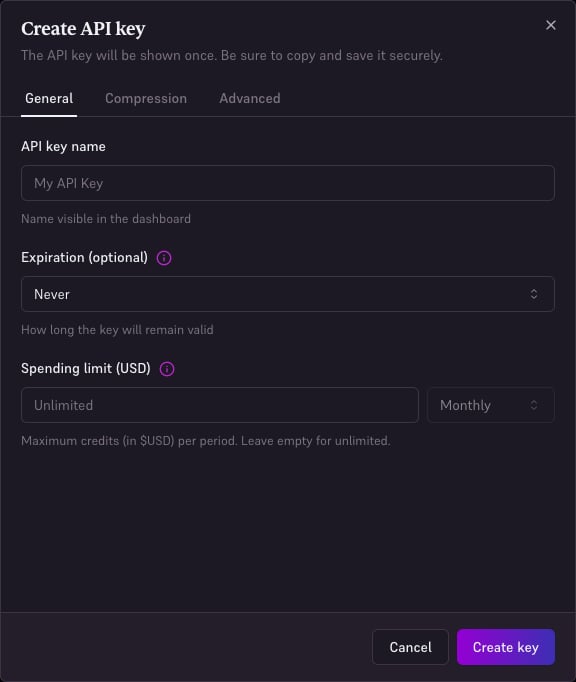
1. Open **API Keys**, create a key, and use a name identifying its application or environment.
2. Configure the available model restrictions, spending limit, and expiry to match that use.
3. Copy the key into the application's secret storage.
4. Send the [test request](/docs/llm-router/quickstart/api-key#test-your-key).
5. Find the request in **Logs**, filtered to that key.
## Restrict a key
A model allowlist limits the key to those models, within the organization's [model access rules](/docs/features/model-access). It cannot re-enable a route disabled by the organization.
Set a [usage limit](/docs/features/usage-limits) with a period. Compression, routing, and BYOK settings can be inherited or enforced at a higher scope; see [Gateway settings](/docs/features/organization).
Enable **Debug** only for an investigation. It captures request/response content for future requests; see [Debug logs](/docs/features/debug).
## Rotate or revoke
Create a replacement key, update the application secret, and verify a successful request with the new key before deleting the old one. Deleting a key can stop clients still using it. For a departed member, also review organization membership and any independently shared credentials.
Do not put keys in source code, screenshots, or browser-side application code. For scripted creation, update, reveal, and deletion, use [Manage Gateway API keys through the Console API](/docs/api-reference/console-api-manage-gateway-api-keys).
## Choose the right credential
| Credential | Used for | Managed in |
| ------------------ | ------------------------------------------------------ | ------------------------------------------ |
| Gateway API key | Model requests through Edgee | **API Keys** or a member's agent settings |
| Provider key | Your account at Anthropic, OpenAI, or another provider | **BYOK** |
| Personal API token | Organization management through the Console API | **Account settings → Personal API Tokens** |
The CLI can provision coding-agent credentials during sign-in and launch. Do not replace them with a personal Console API token.
## Create and verify
1. Open **API Keys**, create a key, and use a name identifying its application or environment.
2. Configure the available model restrictions, spending limit, and expiry to match that use.
3. Copy the key into the application's secret storage.
4. Send the [test request](/docs/llm-router/quickstart/api-key#test-your-key).
5. Find the request in **Logs**, filtered to that key.
## Restrict a key
A model allowlist limits the key to those models, within the organization's [model access rules](/docs/features/model-access). It cannot re-enable a route disabled by the organization.
Set a [usage limit](/docs/features/usage-limits) with a period. Compression, routing, and BYOK settings can be inherited or enforced at a higher scope; see [Gateway settings](/docs/features/organization).
Enable **Debug** only for an investigation. It captures request/response content for future requests; see [Debug logs](/docs/features/debug).
## Rotate or revoke
Create a replacement key, update the application secret, and verify a successful request with the new key before deleting the old one. Deleting a key can stop clients still using it. For a departed member, also review organization membership and any independently shared credentials.
Do not put keys in source code, screenshots, or browser-side application code. For scripted creation, update, reveal, and deletion, use [Manage Gateway API keys through the Console API](/docs/api-reference/console-api-manage-gateway-api-keys).