> ## Documentation Index
> Fetch the complete documentation index at: https://www.edgee.ai/docs/llms.txt
> Use this file to discover all available pages before exploring further.
# Create an API Key
> Create a new API key to use Edgee services.
In your [Edgee Console](https://www.edgee.ai), navigate to **API Keys**.
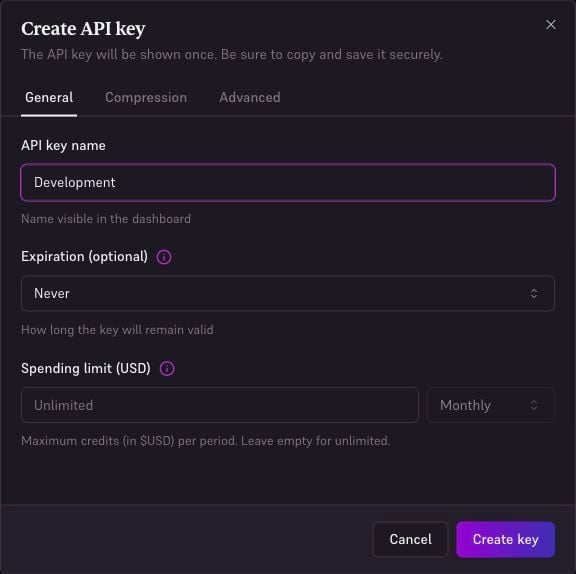
Click **Create API key**, give it a name (e.g., "Development"), optionally set an expiration and spending limit, then click **Create key**.
Copy the generated Gateway key and store it securely. Keep it separate from your personal Console API token and your provider credentials.
 Store your API key securely. Never commit it to version control or expose it in client-side code.
## Test Your Key
Set the copied key in your terminal first, then send a small request:
```bash theme={"dark"}
export EDGEE_API_KEY="your-gateway-api-key"
```
```bash theme={"dark"}
curl https://edgee.io/v1/chat/completions \
-H "Authorization: Bearer $EDGEE_API_KEY" \
-H "Content-Type: application/json" \
-d '{
"model": "openai/gpt-5.2",
"messages": [{"role": "user", "content": "Hello!"}]
}'
```
**Verify:** the response contains a model answer. Open **Logs** in the same organization and find the request. If it fails, use the error message and [Troubleshooting](/docs/troubleshooting). For restrictions, expiration, and revocation, see [Manage API keys](/docs/llm-router/api-keys).
Store your API key securely. Never commit it to version control or expose it in client-side code.
## Test Your Key
Set the copied key in your terminal first, then send a small request:
```bash theme={"dark"}
export EDGEE_API_KEY="your-gateway-api-key"
```
```bash theme={"dark"}
curl https://edgee.io/v1/chat/completions \
-H "Authorization: Bearer $EDGEE_API_KEY" \
-H "Content-Type: application/json" \
-d '{
"model": "openai/gpt-5.2",
"messages": [{"role": "user", "content": "Hello!"}]
}'
```
**Verify:** the response contains a model answer. Open **Logs** in the same organization and find the request. If it fails, use the error message and [Troubleshooting](/docs/troubleshooting). For restrictions, expiration, and revocation, see [Manage API keys](/docs/llm-router/api-keys).